Macworld 2009 Keynote – Highlights

So, Macworld SF 2009 Keynote, where was the iPhone Shuffle!?!!? Devastated.

Oh well, I thought I’d point out some of the highlights of the announcements, at least the things I picked up from following various live bloggings of the event! So I guess it’s kind of a live-blog of live-blogging! I’ll possibly write some more at a later date if there’s anything that really grabs my interest.

iPhoto ’09

Facial recognition tagging support and syncing with Facebook and Flickr. Any photos that get tagged on Facebook will sync back the tags into iPhoto, I think my wife is going to like that feature as she is a major Facebook image uploader.

iMovie ’09

I was one of those people who liked the iMovie ’08 already, but this new version of iMovie seems to provide all the missing features that people were looking for. The new version was demoed by Randy Ubillos who was the guy who re-engineered iMovie in the first place, I hadn’t realised that he was actually the original creator of Adobe Premiere. So I guess this proves he knows his stuff.

Garageband ’09

The ‘Learn to play’ feature looks pretty cool. There are lessons for both keyboard and guitar from popular artists like Sting, Nora Jones and Fall Out Boy. As my daughter just got a guitar for Christmas I think that will be pretty useful. There are 9 free lessons included and you can buy more via a built-in store in Garageband.

iLife ’09 – Available now on the Apple store →

iWork ’09

Some nice new features, Keynote can be controlled via the iPhone / iPod touch using a new app that you can buy from the App Store. Pages has a full screen view, a bit like the edit mode in iPhoto, which makes full use of all screen area (I remember Mac OS 6 had this ‘feature’ built in, you could only run one app at a time!). There’s now linking between Pages and Numbers so data driven features in Pages can use Numbers as a source.

iWork ’09 – Available now on the Apple store →

iWork.com

Ok, so this is connected to the iWork suite but it’s a cool enough and notable feature I thought it was worth highlighting by itself, if for no other reason than to point out how dumb the iMovie in the cloud rumours were! iWork is initially a free beta but will eventually be a paid service (I think Apple learned a lot from the MobileMe launch!), basically you can share iWork documents online and people can view them in the browser and comment on them or download the file to edit and make changes. Very similar to Google docs.

Mac Box Set

As all the iWork and iLife apps only run on Leopard Apple have released the Mac Box Set which brings iWork, iLife and Mac OS X 10.5 in one pack for £149, that’s a pretty good deal. It’s interesting that there’s no mention of Snow Leopard here at all!

Mac Box Set – Available now on the Apple store →

17" MacBook Pro

The rumours were right of course, a non-removable battery! Now before you go complaining it’s for a very good reason. It supposedly provides 8 hours of charge and can be charged 1000 times (compared to 200 – 300 charge cycles on a regular battery).

Other key specs are up to 8GB if RAM, 320GB HD by default with 256GB SSD drive as an option, also an optional non-glare screen! 2.93Ghz processor, 60% greater colour range on the screen. I’m sure it’s going to generate a lot of discussion due to the fixed battery but as it’s less than an inch thick it’s pretty impressive, especially if it can run for 8 hours driving all of that screen resolution! Available at the end of January for US $2799 or UK £1,949).

17" MBP – Available now on the Apple store →

iTunes

All iTunes music will be DRM free by the end of this quarter! There is also new pricing ranging from $0.69 to $1.29. iTunes Music Store on iPhone / iPod touch can now be accessed via 3G network too. All songs will be in the 256k format too.

Some interesting statistics they told were: 6 Billion songs sold, 10 Milion songs available, 75 Million iTunes accounts. I think the flexible pricing was what it took to get the DRM free music, it was definitely needed seeing as Amazon MP3 store has had a lot more DRM free music than iTunes for quite some time.

Yikes, Macrumors.com Macworld Keynote live blog haxx0r3d

Macrumors.com Keynote Liveblog getting haxx0r3d

I had 3 web pages open with liveblogging of the event when suddenly random messages, rude words etc kept creeping in and then it went completely pear-shaped!

No Mac Mini, no iPhone Nano and no Snow Leopard demo!

Two updates that didn’t appear though were a new Mac Mini and the fabled iPhone Nano. Now the iPhone nano I was dubious about anyway but the Mac Mini I was sure was going to get an update, perhaps they’ll do a soft-announcement soon? Also missing was a demo of the OS X 10.6 ‘Snow Leopard’, a lot of people expected to see a demo or at least get some hint of features or progress. I think the Mac Box Set kind of indicated that there wouldn’t be anything being released in the near future.

Well, that’s my live-blog of live-blogging over, time to go check out the Apple website to read more about it all!

iMovie in the Cloud? More like head in the Clouds…

Every year when Macworld Expo in San Francisco draws near it sparks off a bunch of rumours about new products to be launched. I’ve already written a couple of posts (iPhone Shuffle, Mock Mini) in response to some of the rumours.

However, as obviously fake as the mockup of the rumoured Mac Mini update was nothing takes the dumb award like the rumour of an online version of iMovie! A few sites including Techcrunch have written about this rumour but there’s one simple reason which make it unlikely: Bandwidth.

Space Bandwidth – The final frontier

Broadband connections in the UK and US vary between about 2Mb – 20Mb, probably the average connection is about 8Mb1 and even then that is affected by the usual ‘distance from the exchange’ deterioration. Most broadband connections are asymmetric so the download speed is much faster than the upload speed regardless of whether it is a cable or ADSL connection. For the typical 8Mb connection the upload is likely to be less than 1Mb, probably more like 512Kb, so basically you get 1/16th upload speed compared to download. However, even as download speeds increase the upload speed often doesn’t increase at a similar rate, it can reduce to about 1/24th or 1/30th of the download speed.

A camel through the eye of a needle

A basic feature that an online version of iMovie would need to do is allow you to upload video files so you can edit them. It would presumably have to be capable of editing HD video too seeing as most consumer cameras, especially things like the Flip Mino HD,Kodak Zi6 etc are HD capable.

However, HD video footage is big, disk space per hour of footage is at least 6GB2 therefore a 1 minute clip would be at least 100MB in size. Uploading this file on an average (but perhaps generous) broadband connection with 512Kb upload speed would take around 30 minutes! On 256Kb upload that would be an hour!

When you look at those figures you can see the biggest weak spot of any kind of online editing system, especially HD.

iLife / iWork in the Cloud?

It is feasible that Apple could release some more advanced online tools to accompany their iLife / iWork suites, after all the MobileMe Mail and iCal apps are pretty good web-based tools. I think a more obvious choice would be for some kind of online version of iPhoto in the vein of Photoshop Express or Picnik (notwithstanding that full size raw images would present a challenge for uploading too, nothing like the challenge of video files though).

Apple have always been very forward thinking, declaring the floppy drive dead with the launch of the original iMac and declaring 2005 the year of HD with the launch of iMovie HD and Final Cut Express HD. However, I just can’t see that Apple are going to be so forward thinking in regards to improvements in broadband speeds that they will make iMovie into a web app!

It will be interesting to see what is announced on Monday 5th January, I’m very much doubting that I will be eating my words here! I’m still hanging out for the iPhone Shuffle though ;)


1. These speeds are a guesstimate but I imagine they’re not far from the truth.
2. One hour of HD footage in AVCHD format is 6Gb, sizes can increase to 100’s of Gbs for other formats, bit rates etc.

Touchgrind (A short history of skateboarding games)

Anyone who is into skateboarding and owns a games console has no doubt played at least one of the many games in the Tony Hawk Pro Skater series. This game defined the genre for several years and had no equal. In recent years EA’s Skate presented the first game to seriously challenge its place at the top. One of the things that set Skate apart from the Tony Hawk games was that there was a learning curve more closely resembling the real skate experience. Skate was also helped by the capabilities of next generation consoles like the Playstation 3 and the XBox 360 which offered amazing graphics.

In the area of hand-held consoles however, the Tony Hawk franchise offered the only skateboarding games for Sony’s PSP and Nintendo’s DS. Skate was never released for either of these hand-held devices perhaps largely due to the selling point of their high-end graphics. The sequel, Skate 2, will also only be available for the PS3 and XBox 360.

Nintendo’s DS and Wii consoles represented a new approach to gaming. Instead of focusing on photo-realistic graphics like the PS3 and XBox 360 these consoles used a combination of unusual interfaces and input devices to create a unique and new gaming experience. The release of these consoles brought a slew of games making use of the DS’s two screen / stylus input and the Wii’s highly-physical Wiimote / accelerometer based controls. A follow-up title ‘Skate It’ brings the gameplay of Skate to these consoles, although it’s not so much a sequel to Skate but more of a game in its own right. ‘Skate It’ for the DS and Wii makes use of the unique controls of these consoles to offer something even more akin to the real skating. The Wii in particular offers something new with gameplay being controlled with the Wiimote, nunchuk and also the Wii Balance Board enabling game control with hands and feet.

In regards to hand-held consoles the DS is the only platform offering the mixture of unusual interface / input and the unique game play of the Skate It games, although the Tony Hawk franchise is currently regrouping and planning a new wave of games to make use of these types of unique interface so presumably this will include the DS.

However there is also one other unique gaming platform on the scene, one which has kind of slowly crept in under the radar without, intially at least, any kind of fanfare or hyped launch as a gaming platform:

Apple’s iPhone and iPod touch: a gaming platform

The iPhone and iPod touch platform offers an awesome touch screen interface allowing input such as an onscreen keyboard and finger gestures for scrolling and resizing. Since the launch of Apple’s App Store third party developers have been launching games by the thousands making the iPhone platform a hugely popular and financially successful platform for many game developers both small and large.

As I said before Apple really seemed to kind of just sneak in with the iPhone as a gaming platform, although many saw the potential of the iPhone as a platform for mobile applications I don’t think many realised just how capable the platform was especially in the area of graphics performance on such a small device.

Interestingly this isn’t the first time Apple has considered developing a gaming platform, the Pippin console had limited release back in the 90’s but was eventually shelved. Since then many people, including myself, have pondered as to whether Apple, like Microsoft, might make a new attempt to enter the gaming market.

The iPhone and iPod touch are the proof that Apple have indeed entered the gaming market, but like they have done before it is on Apple’s own terms by creating a unique platform unlike anything else on the market.

iPhone + skateboarding = Touchgrind

Ok, we’re up to date with the history lesson. As you might expect such a powerful hand-held gaming platform as the iPhone / iPod touch has some great games available for it, Super Monkey Ball, Crash Cart Bandicoot, Cro-Mag Rally to name a few. But, what about skateboarding games?

There have actually been two skateboarding games to date, the first to launch was called iSkate (iTunes Store Link) but wasn’t really much more than a proof of concept, it lacked any real game play and was poorly received (especially as people paid for it).

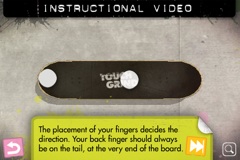
Touchgrind (iTunes Store link) by illusionlabs however is a different story. Built on the same basic principle of iSkate, the idea is that you see the skateboard from a top-down view and you control the board with two fingers. A combination of finger gestures allows you to flip the board in various ways. It’s a bit like playing with a virtual fingerboard, and if you’ve ever messed around with one of those you’ll know it’s hard to do tricks with your fingers!
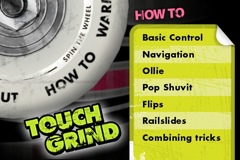
The interface for Touchgrind is nice, you spin a skateboard wheel and choose from one of six sections on the wheel: Options, About, How To, Warm Up, Jam Session and Competition. Options lets you switch off sound effects and About gives you a link to the developer’s website. The next option gets you into the nitty gritty, How To is the first thing you need to check out when you first try out Touchgrind as it explains the concepts of how to maneuver the board and do tricks.

Warning: Learning curve ahead

I have to admit that when I first tried it I found it pretty hard, like the Skate and Skate It games I mentioned before there’s actually a fair bit of a learning curve in getting the techniques down. At first it was a bit frustrating and I ended up coming back to it a few times before it really clicked with me. That element of frustration is actually quite cool though as it’s a pretty realistic skateboarding learning curve, it’s not uncommon to experience frustration learning tricks for real!

After working your way through the How To section and you’ve managed to get to grips with the basic controls then the next section to check out is the Warm Up. This section lets you just go and cruise around, there’s a few ramps and a rail that you can try and grind. There’s not that much to skate but the point is just to get familiar with skating around, trying out the various tricks on some real obstacles as well as in the large amount of empty space around the obstacles.

It soon becomes apparent that with the top-down view that Touchgrind uses it’s quite hard to see where you’re going. Because of this there are icons that indicate what type of obstacles you are near and which direction they are in. This at least gives you some indication of what’s near you and allows you to steer in the right direction. However, it’s still a little tricky knowing exactly when you’re going to be near enough to an obstacle to jump on to it.

To help you know how near you are to obstacles there is also the ability to zoom out by clicking on the magnifying glass in the lower-right hand corner. The view then zooms out and you can see a larger area of the park, not the entire park but a larger section so you can get a better idea of what you’re trying to skate towards.

You can drag around with your finger to see all available obstacles (or in the case of the Warm Up park lots of empty space!). This certainly helps when you’re trying to line up for an obstacle, and is especially useful when trying to gauge how far away from an obstacle you are.

Warmed up? Let’s jam…

After the Warm Up section you can then move onto the Jam Session where you get to use the full skatepark with a lot more obstacles. The main object of the Jam Session is to see how high a score you can get with a single trick or combination of tricks on an obstacle, there’s no time limit so you can just skate around for as long as you want trying to get that flip-to-grind flip-out combo down perfectly!

Competition is the final section and this gives you a 100 second time limit in which to skate around and build up as many points as possible. As you get higher scores new boards are unlocked which can be selected when starting the Competition or Warm Up sections. I’ve managed to get to over 400,000 points so far but still have a way to go to get over 1,500,000 points to get the highest board! I’ll need to practice a bit more :)

Finishing off… Last run…

So, that’s my quick-ish overview of how Touchgrind works, the best thing to do though is go ahead and buy Touchgrind yourself and check it out. It’s only £2.99 from the App store but the quality of the gameplay in Touchgrind, like many of the apps in the app store, is worth more than its price tag. The developers of the game, Illusion Labs are keen to get feedback from users so try it out and tell them how you think it could be improved. I’m sure some kind of multi-player mode is likely to be added in future, playing over wifi could be an interesting experience although I’m not quite sure how that will work due to the challenges already present with the top-down UI that Touchgrind uses.

I think Touchgrind is a great example of how powerful a platform the iPhone / iPod touch is, the touch screen interface offers a completely new control interface for a skateboarding game. As yet Touchgrind doesn’t make use of the accelerometer in the iPhone / iPod touch, perhaps this could be made use of in a future version? Or perhaps in some other skateboarding game?

I’ve included a few more screenshots from the game just to give a bit more of a taste of how it looks, go ahead and check it out.


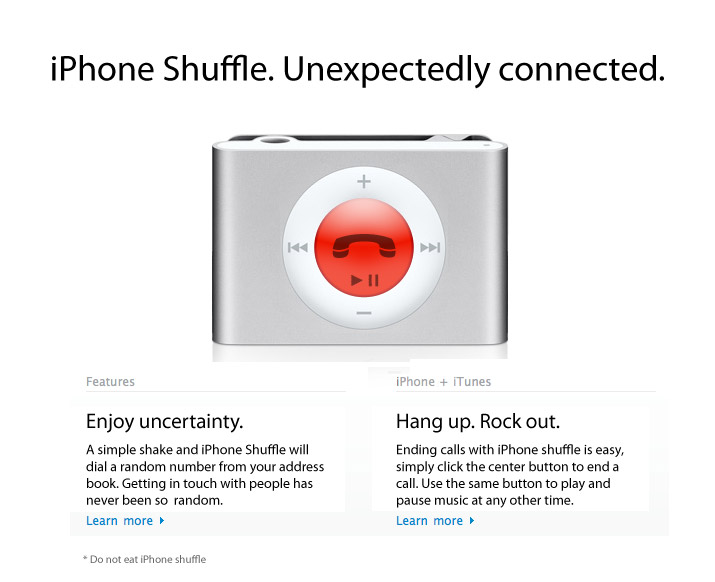
Forget the iPhone Nano, here is the iPhone Shuffle

The other hot rumour leading up to Macworld San Francisco is for a smaller form iPhone, supposedly called the iPhone Nano. Macrumors published a sketchy picture of the supposed iPhone Nano which shows it as basically a shrunk-down version of the regular iPhone.

Personally I can’t see that being real, it simply does just look like a scaled down iPhone. However, people said the same thing about the previous generation iPod Nano when pictures showed the short squished format but it turned out to be real so who knows?

My money though is on an even smaller device – the iPhone Shuffle!

Secret pictures of the new iPhone Shuffle

You heard it here first! ;)

Is this the new Mock Mini, erm, I mean Mac Mini…

Macworld San Francisco will soon be taking place and as ever the rumour-mill is hot with talk of a revamped Mac Mini, along with the talk there are the usual sketchy photos of the supposed new products!

MacObserver linked to a post on Macenstein.com which shows one of these sketchy product shots, however, I took one look at it and thought "That’s been Photoshopped together"! It got me thinking that I should make my own mockup of a Mac Mini just to show how easy it is, and also how obvious the Macenstein shot looks to me.

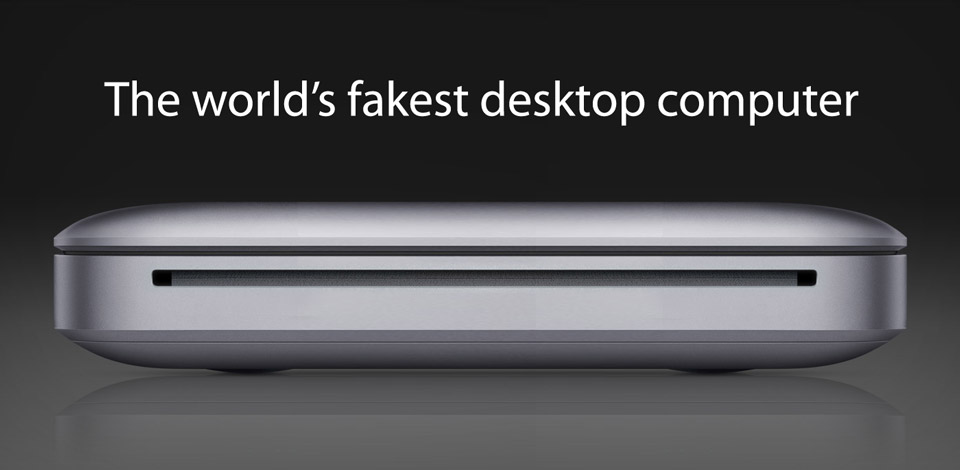
Presenting the new Mock Mac Mini!

The world's fakest desktop computer

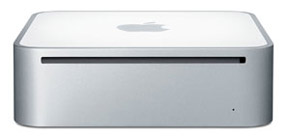
This is my version of the Mac Mini that Macenstein have published, the main thing I think looks odd is the thin gap at the top of the casing, it pretty clearly looks like the closed lid of the current MacBook / MacBook Pro. And that’s exactly what was used to make this mockup, just two images, the first taken from the current MacBook webpage and the second from a picture of the current Mac Mini:

Using Photoshop CS4 I simply duplicated the first image of the MacBook, flipped it horizontally, cloned out unwanted elements and then used Content Aware Scaling to resize the case and the background. I then copied and pasted the drive bay slot from the Mac Mini picture and blended that in.

Voila, one dubious unreleased Mac Mini!

BBC launches multi-platform downloadable iPlayer using Adobe AIR runtime

Finally people can stop complaining that the BBC only support Windows XP for its downloadable iPlayer application. Using a cross-platform application developed using Adobe’s AIR the BBC have launched a downloadable iPlayer that can run on Windows, Mac and Linux.

I’ve written quite a few times about the iPlayer and it seemed to me that the only viable solution for a cross-platform iPlayer was to use Flash and/or Adobe AIR. The only element I wasn’t sure about was how DRM would be provided:

I think the only technical challenge left to fill in is the provision of a decent DRM scheme to use within Flash video, if Adobe can provide that piece of the puzzle then there’s absolutely no reason for the BBC to use Windows Media DRM and cause thousands of licence payers to be locked out of using a service they are entitled to use.
Quote from "Flash: Can it be a viable alternative to Windows Media DRM for the BBC?" blog post

Well, Adobe stepped up to that challenge, Flash Media Rights Management Server has been used for some time for Adobe Media Player and this same technology is being used for the new iPlayer application. So that’s good news for those of us who don’t use windows. With Adobe’s AIR runtime supporting Linux as well then it makes a pretty good platform.

How do you use the Adobe AIR iPlayer?

At the time of writing this there’s not a lot of content available and I could only find one episode of Never Mind the Buzzcocks that showed a download link. However, that’s simply because content needs to be specifically encoded for this version of the iPlayer so it will take time for content to be encoded and made available.

There’s a few key things to keep in mind, it is currently a Beta program and is part of the iPlayer Labs program. You need to visit the Labs page and opt in to be a Labs tester, once you’ve done this you will then see the download links when they’re available. You will need to download the AIR based iPlayer desktop, although you’ll presumably be prompted to do this if you click on a download link.

The whole install process is pretty simple, the latest Adobe AIR runtime will be installed along with the iPlayer desktop so there’s no need to go and install that beforehand. All in all it’s a pretty simple process and it worked well so far.

An idea for improving iPhone App management in iTunes

The iPhone App Store is a huge success with thousands of applications available. However, it doesn’t take long after downloading a whole load of apps before you’ve got pages and pages of apps on your iPhone. With just two, three or maybe even four pages of apps it’s not too difficult to remember where specific applications are but beyond that it gets harder.

One solution to helping find the apps installed is to create pages with specific types of apps on each page, perhaps Social networking apps on one page, games on another and so on. However, you can soon end up with a lot of pages using this method. Currently on my iPhone I have about seven pages of apps and it’s getting increasingly difficult and time consuming to manage this as I add more applications.

Screenshot of my iPhone screen layouts
The current app screens on my iPhone

The problem is that you can only move applications around one at a time so trying to move apps from one page to another is a pretty slow and laborious process. It’s made worse because there is no way to adjust the order of the pages of apps or to insert a new page, so if you wanted to insert a whole new page in between your second and third pages the only way to do it is move all of the apps from the last page onto a new page. You can then move all the apps from the the third page etc one page forward, not a simple or quick process! Obviously this method of management is pretty useless with an increasing amount of apps.

Tuning up iTunes App management

So, what can be done to fix this? Well, I’m sure something could be done to make app management on the iPhone itself better but the solution I’ve got in mind is to improve the Applications management inside the desktop iTunes application.

When your iPhone is mounted you can currently configure which Apps are synced across to your device, What’s needed is an additional panel within this section that shows the layout of all the pages of apps on the iPhone. This panel would allow you to easily drag and drop applications between pages using your mouse or trackpad, you would also be able to re-order the pages and insert new pages in between the existing pages. It would also allow you to delete pages including all of the apps on them, unless of course it contains any of the core apps that cannot be deleted. In that circumstance a warning message would appear indicating that fact but the page would be left alone.

Mockup of iTunes app management screen

It seems like a simple and user friendly way to manage all your apps. If you think of how you manage music in iTunes, you can create playlists and drag and drop files in and out of them. This method of management would give that same kind of control for applications.

So, how long until we see this method of app management in iTunes? ;)

Goodbye N95, Hello iPhone

It’s been 18 months since I got my Nokia N95 and I’ve enjoyed using it, the combination of a phone with a good quality still camera and also pretty good video camera along with wifi access has been great to use.

Since getting an iPod touch last christmas it was pretty much inevitable that once my phone contract was up that I would switch to an iPhone. Although the N95’s killer app is a great camera, the array of applications for the Nokia N95 pales in comparison to what is available for the iPhone and iPod touch.

In contrast to the N95 the iPhone’s biggest weakness is its camera, much lower resolution stills and no video support at all. However, overall the iPhone is a much better device so I will live with the camera as it is and will probably keep a pay as you go sim in my N95 and still make use of it for filming and photos. The iPhone’s killer app is the fact that there are many killer apps available for it due to the success of Apple’s App Store.

When I got the N95 back in June 2007 I called it my iPhone substitute, it’s served me well but I’m enjoying using my iPhone a lot. It’s sure to be the subject of a few blog posts in the months to come.

~Rick

iPod Touch 2.2 firmware update breaks BBC iPlayer (Fixed!)

The recent 2.2 firmware update for iPhone and iPod Touch brought some great new features but also an annoying glitch, it breaks the ability to play content on the BBC’s iPod / iPhone version of the iPlayer site!!!

If you try to playback something on the iPlayer site you get a message saying "Sorry, programmes can only be accessed over a wifi connection". For some reason the BBC site thinks that I’m accessing it via a 3G connection, which isn’t allowed for the iPlayer site!

As it turns out this problem only affects iPod Touch users and not iPhone users, and the problem seems to be down to the detection script that the iPlayer site uses so it will require the BBC to make a fix to their code to resolve the issue, so hopefully it won’t take them long!

UPDATE
The problem has been fixed! Access to the iPlayer on the iPod Touch has been restored :)

New features in the iPod Touch / iPhone update

Update All in App Store iPhone firmware 2.2The update did bring some cool new features though, you can now download podcasts directly within the iTunes store application and there’s also an ‘Update All’ button in the App Store application, very useful when you’ve got a bunch of apps with updates. Safari has also had a revamp to its interface which makes better use of space by placing the search and address bars on the same line, each one expands to fill the whole line when you click into it. However, not all features are available on the iPod Touch.

No Street View in Maps for iPod Touch users

Typo in the iTunes Podcast section in iPhone Firmware 2.2One new feature that I was looking forward to checking out was Street View in the Google Maps application, but alas it turns out this is only available in the iPhone update and not the iPod Touch update. I’m not sure if this is intentional, perhaps due to the accounting differences between the iPod Touch and iPhone.

Usually when there are features added that require an additional fee for the upgrade it’s for completely new apps, not just for upgrades. Applying the same logic you’d expect to pay for the ability to download podcasts too. So I’m left wondering why Street View is missing in the iPod Touch update, maybe it’s just a mistake? There were a few other issues that got in there, such as a typo in the iTunes app Podcast section and a photo-resizing bug.

~Rick

Update:

Users with jailbroken iPod Touches have been able to turn on Street View on the iPod Touch, so I’m wondering more if this was an accidental omission in the 2.2 update.