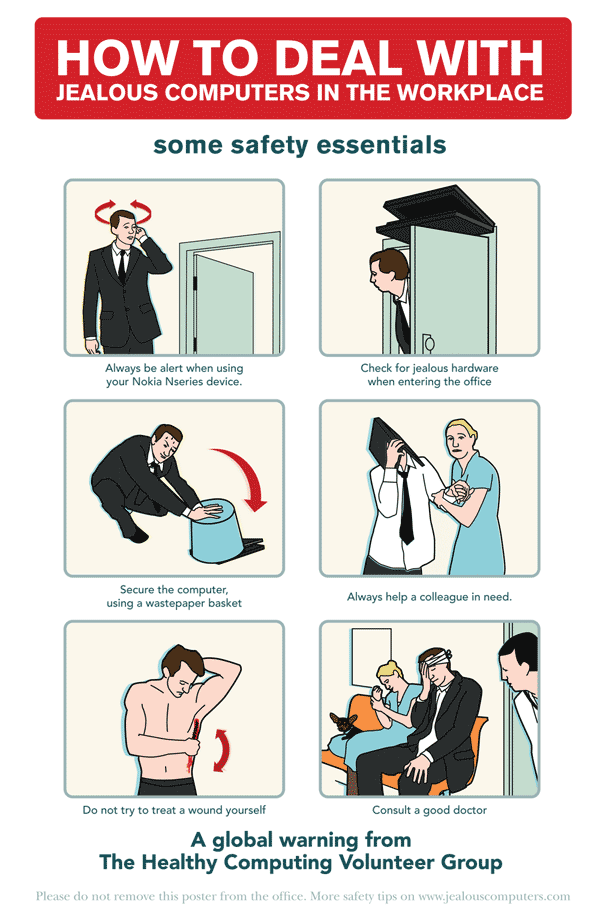
In the interest of public safety I’m helping pass on this public safety announcement.
If you’ve got a Nokia N95 you might need to take care around your desktop or laptop computer ;)
Find out more at www.jealouscomputers.com.
~Rick
The digital domain of Rick Curran
In the interest of public safety I’m helping pass on this public safety announcement.
If you’ve got a Nokia N95 you might need to take care around your desktop or laptop computer ;)
Find out more at www.jealouscomputers.com.
~Rick
If you’re in the UK reading this then you’ve quite probably seen the TV adverts for PCWorld which offer Laptops for free (or a discount of £300 on other laptops) if you sign up for a 2 year Orange broadband contract.
I’d heard about Orange in France offering some kind of deal like this but it’s interesting to see it happening here now. The fact that they are doing this raises a few issues, or points of interest anyway.
This is kind of a sweeping statement but mainly I mean that PCs, and laptops especially, have become much cheaper. To the point that they are cheap enough to offered for free upon signing up for a 2 year contract for internet access!
That whole model is pretty familiar, sign up with any mobile phone company for 12 months, 18 months or even better 24 months and they’ll offer you an increasingly better range of free mobile phones to choose from. Interestingly though, a lot of these phones are worth a lot more than a £300 laptop!
Seeing the parallel between these two business models it’s making me wonder why the cable and satellite TV companies don’t do the same?
In as much as phones and laptops have become something of a commodity High Definition HD TVs are quickly following suit. PC World list 26" HD Ready LCD TVs for about £350, if a TV costs only this much then why not offer a good deal on televisions when signing up for a contract with you local cable or satellite TV company?
The costs of all these products is fairly similar, I can’t see any reason why this couldn’t be done? One added benefit is that it would greatly increase the uptake in viewing HD television and help bring more momentum behind the HD format It’s really common to change mobile phones every year or so (at least on pay monthly contracts in the UK it is anyway!) and people often upgrade computers on average between 2 – 4 years of usage. But Televisions have always had a much longer shelf life, it’s not uncommon for people to have TVs that are at least 5 years old but possibly over 10 years old!
Many people’s timescale for buying a new TV will be several years away, but they will likely switch between cable or satellite TV providers several times within the lifetime of that TV, so why not offer free TVs in exchange for signing up for a fixed contract?
Just to balance this whole argument I have one reason why this would be a bad thing, it’s basically why the frequent offering of free mobile phone and now free computers is a bad thing – the environmental impact.
I’ve written above that phones (and computers now) are a commodity, there’s something about that I don’t like. People’s attitudes towards technology increasingly becomes far more throw away. A recent upgrade for my mobile phone landed me a shiny new Nokia N95 for free in exchange for an 18 month contract, the reality is that this device sells on Amazon at the time of writing for about £450. There’s no way I would ever have spent that kind of money on a phone, despite how smart a gadget it is. It’s easy to see how the true cost of these devices is lost on people, they’re just seen as free phones1.
It’s a little bit of a scary thought to see computers go that way and perhaps be even worse to see TVs be viewed that way. The environmental impact could be pretty huge. Not that the impact of these devices isn’t huge already of course! I appreciate that this kind of technology fills landfills regardless but at least when you pay for something you are likely to value it more than if it is just given to you. Wow, that sounds like a life lesson a parent would teach their child!2
~Rick
There was an interesting post on the BBC News website today entitled "British blamed for Basra badgers" which starts of with the following paragraphs:
British forces have denied rumours that they released a plague of ferocious badgers into the Iraqi city of Basra.
Word spread among the populace that UK troops had introduced strange man-eating, bear-like beasts into the area to sow panic.
In the interest of public safety I thought I would post a few links to help educate people about Badgers:

This Honey Badger was unavailable for comment.
~Rick
There’s an interesting trailer for a new movie by JJ Abrams of Lost fame, it’s currently only titled as “1-18-08” but apparently is codenamed “Cloverfield”.
There’s a trailer for it on the Apple Quicktime Trailers site but I did manage to find a version on YouTube:
It looks very intriguing, hard to say exactly what the films about, although it appears to be some kind of monster. In true “Lost” tradition there are some clue sites around on the web:
~Rick
I’ve posted my Simpsons Character the other day, but my wife made an even better one. I’m sure they didn’t have facial hair and glasses available when I used the Simpsons Movie avatar creator.
Here’s my new Web Version 2.0 Simpson’s avatar…

~Rick
Well, I’ve had a week or so to play around with my Nokia N95 now although I haven’t really made use of the music or video playing aspect of it other than to record a little bit of video myself. But here’s a few more thoughts about my experience with it so far.
On my old Nokia N80 I used to find it sometimes slid open whilst in my pocket, although I don’t think I ever called anyone by accident fortunately. But with the N95 sliding open both upwards and downwards I find this happens way more easily. I’m going to buy myself another Crumpler PP90 neoprene case to, hopefully, keep it from opening up. On the plus side though with the N95, it will auto-lock itself whether it has been slid open or not if the keys are not touched. So if it does get unlocked accidentally it will at least lock itself again.
Despite the fact that there is a 5 megapixel camera in the N95 I’ve found that it still likes reasonably light environments to take good shots. Although a couple of test photos and video that I shot at home definitely performed better than my N80 would have done, so there is an improvement there and a lot closer to performing like a regular digital still camera worth it’s salt would do. You do need to give the autofocus / image stabilising time to kick in before you can take a shot so it’s not great if you need a snap in a hurry. I also like that there is a lense cover so you can stop dust getting into it, although I keep forgetting to close it!
Here’s a couple of sample shots, one taken with my N95 and one with my N80 for comparison.

Picture taken with Nokia N95 – Click image to view full size image

Picture taken with Nokia N80 – Click image to view full size image
Connecting to wifi with the N95 is much easier than the N80, using the N80 you could browse for open WIFI networks using Connection Manager (Connect->Conn. mgr->Availab. WLAN) but when you tried to use ‘Options->Define access point it basically redirected you to go into ‘Connection Settings’ and do it there instead. A total wild goose chase and very unuser-friendly. I don’t know if that is just on the Orange firmware or not, maybe that works for some people?
On the N95 you can simply click browse for a WIFI network and simply select and join it by providing the appropriate password etc. Much better.
Unlike an iPhone you can get it here and now in the UK! I really don’t intend to compare the N95 with Apple’s iPhone as I don’t think it’s right to compare them feature by feature. Also the fact that I don’t have an iPhone means I can personally do it! My friend Alyn in Toronto has gotten his hands on one though (and has managed to activate it!), Alyn has written a pretty good overview of his experiences with it so far, minus the phone calling part, although he’s going to test that out on a visit to the US very soon.
I got Alyn to send over a couple of photos of it with Suburbia in the browser just so I could see he wasn’t faking it ;)

I also got Alyn to send over a picture of it next to some of his other devices just for size comparison.

Left to right: Dell Axim 51v, Apple iPhone, 5G iPod with video and Motorola L7 SLVR
That’s all for now, I will probably write some more about the N95, I still need to properly put the video camera through it’s paces and see how the claims of DVD quality footage live up.
~Rick
Apple published Guidelines for developing web content for the iPhone over at http://developer.apple.com/iphone/. It’s good to see a focus on standards based development being encouraged there, it makes sense given that the Safari browser on the iPhone has great support for XHTML and CSS, particularly CSS 3 properties – of which the iPhone makes particular use of, more of that in a moment.
The guidelines are split into several sections:
This section introduces you to the whole concept of interacting with the iPhone, mainly that the input device is not a mouse but your hand so it’s not as precise as a mouse so web interfaces for the iPhone need larger click targets to interact with. As has been pointed out on various blogs there is no copy and paste, but there is also no drag and drop or text selection either so this is another factor to keep in mind.
Safari on iPhone doesn’t have windows that can be moved around or have scroll bars like a conventional browser, content is resized intelligently to fit the viewing area, it is recommended to avoid wide blocks of text. Double-tapping is used to zoom in to content.
This section really reinforces the use of web standards for designing pages for the iPhone. Makes the point that Safari on iPhone uses a ‘real’ browser in that it doesn’t use stylesheets targeted towards handheld devices, it’s intended to give a rich browsing experience by supporting HTML 4.01, XHTML 1.0, CSS 2.1, partial CSS 3.xx, JavaScript 1.4, DOM support, AJAX, XMLHTTPRequest.
It encourages the use of separate HTML, CSS and Javascript as well as using valid HTML, and also optimised images and script content to keep sites running smoothly.
Apple published Guidelines for developing web content for the iPhone over at http://developer.apple.com/iphone/. It’s good to see a focus on standards based development being encouraged there, it makes sense given that the Safari browser on the iPhone has great support for XHTML and CSS, particularly CSS 3 properties – of which the iPhone makes particular use of, more of that in a moment.
The guidelines are split into several sections:
This section introduces you to the whole concept of interacting with the iPhone, mainly that the input device is not a mouse but your hand so it’s not as precise as a mouse so web interfaces for the iPhone need larger click targets to interact with. As has been pointed out on various blogs there is no copy and paste, but there is also no drag and drop or text selection either so this is another factor to keep in mind.
Safari on iPhone doesn’t have windows that can be moved around or have scroll bars like a conventional browser, content is resized intelligently to fit the viewing area, it is recommended to avoid wide blocks of text. Double-tapping is used to zoom in to content.
This section really reinforces the use of web standards for designing pages for the iPhone. Makes the point that Safari on iPhone uses a ‘real’ browser in that it doesn’t use stylesheets targeted towards handheld devices, it’s intended to give a rich browsing experience by supporting HTML 4.01, XHTML 1.0, CSS 2.1, partial CSS 3.xx, JavaScript 1.4, DOM support, AJAX, XMLHTTPRequest.
It encourages the use of separate HTML, CSS and Javascript as well as using valid HTML, and also optimised images and script content to keep sites running smoothly.
This section starts to get to more of the iPhone specific code examples that hook into the dedicated apps on the iPhone. You can click on Telephone numbers in Safari and the number will be automatically dialled, Safari will automatically convert numbers that look like phone numbers into telephone links. However you can format a telephone link on purpose:
<a href="tel:1-408-555-5555">1-408-555-5555</a>
Email links are in the standard format and open up Mail in order to send an email., links to Google maps take the standard link format also but these are opened up into the dedicated Google Maps application on the phone. I believe that links to YouTube movies do something similar but there is no mention of this in this section.
This section gets more interesting and links back to my initial mention of CSS 3 properties. If you want to provide a particular window size for a page to be viewed on the iPhone you can set an iPhone specific stylesheet by using a CSS 3 media query like so:
<link media="only screen and (max-device-width: 480px)"
href="iPhone.css" type="text/css" rel="stylesheet" />
There are more guidelines for laying content out for the iPhone viewport such as a recommended width of 320px so that the layout doesn’t change between portrait and landscape modes. It also details some webkit specific CSS properties to help control text sizing. Image formats supported are JPG, PNG, GIF and TIFF.
Formats and bitrate advice is provided here to help optimise video for WIFI and EDGE network capacities. Maximum video dimensions of 480 x 360px are recommended. Formats supported are H.264, MPEG-4, AAC-LC, .mov, .mp4, .m4v, .3gp file format, video or audio that can play on an iPod.
There is advice for the server side of providing audio and video for use on the iPhone too, interestingly the RTSP protocol is not supported but apparently only video via HTTP streaming.
This set of guidelines covers the resource capacity of Safari on the iPhone. Downloaded resources such as CSS, HTML, Javascript, images or other non-streamed media must be less than 10Mb. Javascript execution is limited to 5 seconds before it times out, this will really mean people having to review their use of the various javascript libraries available and make sure that only the bare essentials are present. Interesting to see how Adobe’s Spry library stands up on the iPhone.
Other information covers support for files including the various mime types, PDF is supported but not (as has been widely covered on various blogs!) Flash or Java. I think various browser testing scripts for detecting Flash will need to be updated to factor in the iPhone’s lack of flash support. I wonder how long it will be before we see Flash on the iPhone? It surely must be coming, seems like a missing piece of a puzzle to me? It also covers the Security support of Safari such as SSL and RSA.
It ends with some useful web development links including W3C, WHAT-WG and Web Kit project site.
There’s a real push throughout about the fact that web standards and associated best practices are an integral part of creating successful sites that work well on the iPhone safari browser.
When I’ve got a moment I’ll try out a the iPhone specific code, especially now that my friend Alyn seems to have successfully gotten his iPhone activated, more about that on his blog I’m sure.
~Rick
Well, I’ve previously posted my Second Life avatar here, but now thanks to The Simpsons Movie website you can create your own Simpson’s Movie Avatar.
This was the closest I could get to creating myself, there were no options for facial hair so it’s lacking that, plus I’m wearing shorts all the time at the moment! (I chose the ten pin bowling t-shirt option is because I won at bowling the other night!).

I just got a Nokia N95 today, I’m pretty stoked to get this phone especially as I got it for free, although on condition of an 18 month contract with Orange. I notice that Amazon list the N95 without sim card for £459 so I’m happy with the deal I got from Orange.
The phone is pretty slick, it’s a slider phone but it opens up both ways, one way for keyboard, the other for media player controls.
Although not quite as easy as simply rotating the device like the iPhone it is very easy to toggle from portrait to landscape view in most applications. This is especially good for web browsing I’ve found.
This is a rough list of features of the N95:
I’m beginning to play around with it so I’ll write some more once I’ve gotten into it. I’m interested to see how the still images and video footage works out, the little I’ve used them so far is indoors with fairly low-light conditions and it’s definitely an improvement over my old Nokia N80 for still images.
One thing I did notice is that it felt very responsive when navigating around the various applications. I read a few reviews of the N95 which criticised the N95 for being sluggish, I found the total opposite, maybe there was an earlier version of the firmware which didn’t work so well for the people who wrote these reviews. It’s certainly a lot better than any other Symbian based phone I’ve had.
One of the reasons I love the Symbian OS is the various applications that are available, not just commercial apps but various freeware / open source apps.
I’m going to have a good look for some interesting applications that really make use of all the hardware thats packed into the N95. One application I came across already is Movino:
Movino is a collection of applications for streaming and broadcasting live video from smartphones. The main applications are the following:
- A client for S60 smartphones
- A smartphone client for J2ME
- A gui application and a QuickTime component for OS X
- A video server for linux
- A drupal web front end
Basically it lets you use the phone as a webcam source for things like Skype chats etc. I’m going to have to try this on my G5 tower at work and see how it goes, it sounds pretty cool though.
I’ll write more once I’ve used it a bit more.
~Rick
In my recent post "Update on the ‘Four Mysteries of the Universe…" I highlighted the fact that 3 out of 4 ‘mysteries’ had been answered. Well, Apple answered mystery #2: AVCHD editing software today with the release of Final Cut Pro 6.0.1. The Final Cut Pro update page states:
New in Final Cut Pro 6.0.1 Update
Improves overall stability, resolves issues with long filenames on non-HFS systems, includes improvements for both FxPlug plug-ins and master templates. Log and Transfer support for the AVCHD format.
I think I can hear a collective sigh of relief from many Mac using purchasers of cameras such as Sony’s HDR-SR7 or HDR-SR1 cameras as they can now (after months and months since the cameras came out!) edit the footage from these cameras!
So, go get your wallets out and buy Final Cut Studio Pro 2 and get editing that AVCHD source footage!
~Rick