Open doors, not closed Windows?

This post is a bit of a follow-up to my last post ‘Dear BBC…‘ regarding the BBC’s new iPlayer proposal which is going to use Windows Media DRM to deliver the files. This is basically just a few thoughts / ponderings based on things I’ve been reading related to this whole issue.

Windows Media DRM, is it the only solution to the iPlayer requirements?

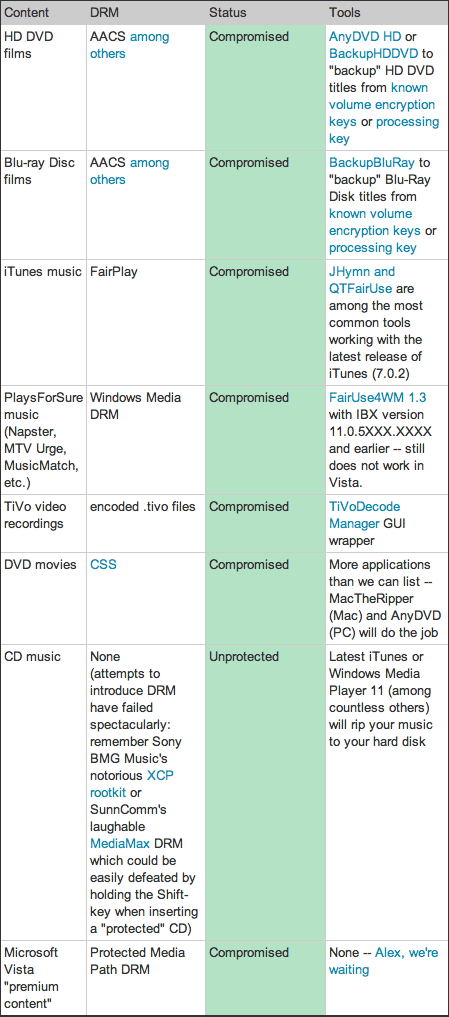
I’ve been looking around a little bit to see if there are any alternatives to using Windows Media DRM (I’m going to refer to this as WMDRM for short herein) for delivering the media that the BBC want to make available. The main reason that WMDRM has been chosen is that it is apparently the only form of DRM that will provide the means for the content to time out at the appropriate point. The BBC’s proposal suggests that programmes will be available to download for up to seven days after original broadcast but that the files will be valid for up to thirty days after downloading.

Now what I wondered is whether WMDRM really is the only option available for delivering this kind of time-sensitive protection, so far though I haven’t really found an alternative DRM. I have heard rumours that Apple’s FairPlay DRM has this kind of development in the pipeline though, the more I think about it I reckon Apple already has something like this working. However, given that Apple’s model of selling content on the iTunes Store is purely for outright purchase rather than ‘renting’ content coupled with the fact that Apple don’t currently licence their DRM to anyone else there is no need for Apple to implement this kind of model in practice. But I’m pretty sure they’ve got this kind of function written into FairPlay if / when they want to use it.

A couple of points of possible interest for alternative DRMs I found are:

  • Real Networks Helix – Real Helix platform (of note is that Real for a while managed to reverse engineer Apple’s FairPlay and offered the only online music store that could deliver Music using their own format as well as DRM’ed Windows Media and FairPlay’ed DRM tracks for use on iPods, however Apple put a stop to that functionality in various software updates, plus Real generally got slated for their accompanying PR campaign.)
  • OpenIPMP – Described as ‘Open source DRM for MPEG-4 and MPEG-2 adhering to ISO/MPEG IPMP open standards (MPEG IPMP Hooks and IPMP-X), ISMAcryp and OMA DRM 2 specs. Includes CA, PKI, DOI mgmt, ISMA streaming, license server, encoding/encryption, player, plugin architecture, etc‘.

The only good DRM is NO DRM?

Perhaps a better option is to not use DRM at all? A growing number of companies, organisations and people seem to think so. About a year ago the British Library expressed concern about the impact DRM has on their ability to ensure long-term access to copyrighted content, part of the British Library’s role is to catalogue everything published in the UK. DRM makes this difficult or impossible and getting round it, perhaps, illegal.

At the recent Midem music trade fair in Cannes the topic of selling music without DRM was discussed, perhaps this shows a turning of the tide by the Labels considering DRM-free distribution as the way forward. EMI has already experimented with DRM free music sales through Yahoo Music using raw MP3 format audio files.

There are perhaps several reasons why the Record Labels may be interested in selling tracks without DRM, one of which is the Labels’ desire to have better control over the music market, something that DRM stops them from doing. Another reason is that some Labels seem to perceive the iTunes Store market dominance as some kind of monopoly hold over the labels, this is true to the extent that Steve Jobs has resisted the Label’s demands for a different pricing structure based on popularity of tracks rather than the standard $0.99 / £0.79 per track model used by iTunes and many other online music stores. There are growing calls from European countries for Apple to open up their FairPlay DRM to licensing, Norway being the most recent country to rule that the FairPlay DRM terms and conditions violates local laws.

I’ve heard and read people say that Apple want to keep FairPlay DRM in place without licensing as it ensures their iPod hardware and iTunes Store sales continue to be successful. However, I’ve always felt that FairPlay DRM’s restrictions are about the least restrictive out there, couple this with Steve Jobs resistance to the Record Labels’ attempts to place further restrictions (albeit with some compromise regarding CD burning) and it’s never appeared to me that Apple would enforce DRM if they had a choice, they did promote the ‘Rip, Mix and Burn’ meme after all!

Joking aside though, my feeling on this seems to be confirmed by an article by Steve Jobs posted on Apple.com on 6th February entitled ‘Thoughts on Music’. The article contains a lot of interesting bits of information, it gives a background to how we got to the current state we are in regarding DRM and music. Steve also proposes three possible ways forward regading selling music online:

  1. Continue with the way things are with multiple competing DRM schemes.
  2. Apple to open up FairPlay DRM.
  3. Abolish DRM entirely.

Steve gives a good explanation of what is involved for options 1 & 2, however, the third option is the most interesting:

The third alternative is to abolish DRMs entirely. Imagine a world where every online store sells DRM-free music encoded in open licensable formats. In such a world, any player can play music purchased from any store, and any store can sell music which is playable on all players. This is clearly the best alternative for consumers, and Apple would embrace it in a heartbeat. If the big four music companies would license Apple their music without the requirement that it be protected with a DRM, we would switch to selling only DRM-free music on our iTunes store. Every iPod ever made will play this DRM-free music.

Why would the big four music companies agree to let Apple and others distribute their music without using DRM systems to protect it? The simplest answer is because DRMs haven’t worked, and may never work, to halt music piracy. Though the big four music companies require that all their music sold online be protected with DRMs, these same music companies continue to sell billions of CDs a year which contain completely unprotected music. That’s right! No DRM system was ever developed for the CD, so all the music distributed on CDs can be easily uploaded to the Internet, then (illegally) downloaded and played on any computer or player.

So, there it is, straight from the horses mouth so to speak. If there was ever any doubt about Apple’s thoughts / motives regarding DRM I think Steve Jobs just made it quite clear.

What’s this got to do with iPlayer? Is DRM a necessary evil in this instance?

I think it highlights the two different functions or types of DRM in use: One for outright purchased content and one for leased or time-sensitive content. It does appear potentially that there is no need for DRM on purchased content but that there is a need for protecting content that publishers want to make available for a limited period of time. Mmm, so, I’m not really any further forward at presenting an alternative solution for the BBC in regards to the iPlayer’s DRM am I? Here’s a few thoughts:

  • Apple could step up to the mark and make a version of FairPlay available to the BBC that allows time-sensitive content.
  • Adobe could step in here and make a DRM method for their Flash player format, especially ideal with the recent launch of the Flash player for Linux

Apart from those couple of thoughts I’m not sure of a way forward, so I’m still not very happy with the current BBC iPlayer proposal. Amongst the details of the BBC Trust’s proposal is discussion of other methods of delivery such as peer-to-peer file sharing, according to Wikipedia the BBC have done some tests using a peer-to-peer system called Kontiki. I’m not sure this really offers anything other than a different method of delivery rather than an alternative DRM method though. Of interest though is a new venture called Joost that was created by the original founders of Skype, their ‘About us’ page states:

Joost™ is a new way to watch TV, free of the schedules and restrictions that come with traditional television. Combining the best of TV with the best of the internet, Joost™ gives you more control and freedom than ever before – control over what you watch, and freedom to watch it whenever you like. We’re providing a platform for the best television content on the planet – a platform that will bring you the biggest and best shows from the TV studios, as well as the specialist programs created by professionals and enthusiasts. It’s all overlaid with a raft of nifty features that help you find the shows you love, watch and chat with friends, and even create your own TV channels.

So, an interesting delivery model but it doesn’t provide an answer to the challenge of finding an alternative DRM for use with the BBC iPlayer proposal.

Perhaps if Music becomes DRM-free, TV / Video will follow suit?

Steve Jobs’ article cites the fact that 90% of music sold is via CD format that contains no DRM whatsoever and this is the reason why DRM for music online makes no sense as it is so readily available in non-drm form. In contrast TV shows and Movies on DVD are primarily in a protected format so that argument doesn’t hold up there. Is it really feasible to expect the BBC and any other provider of TV / Video content to make it available without DRM? I can’t really see it happening, although anything that is distributed using those methods is sure to have it’s DRM circumvented and the content finding it’s way onto sites such as YouTube, Google video and other web sites. It’s still probably a losing battle for the Movie / TV industry but one that I don’t think they’ll yield too in a hurry.

Finishing up, any ideas?

Researching and writing this has made me have a little empathy with the BBC’s situation. They are facing, like Apple did with the big music labels when they proposed the iTunes Store, the requirement to provide a protected way to distribute digital files to satisfy the holders of the copyrighted material. I haven’t really found an obvious viable alternative, other than just dropping DRM altogether.

Anybody got any other ideas / suggestions? If you do then don’t forget you have an opportunity to give feedback on the BBC Trust’s proposals. I encourage you to check out the questionnaire on the BBC Trust website, paying particular attention to question #5:

"How important is it that the proposed seven-day catch-up service over the internet is available to consumers who are not using Microsoft software?"

Don’t forget that the Microsoft DRM the BBC iPlayer will use will also limit functionality for certain older Windows OS’s too, so it’s not just an issue for Mac OSX and Linux users!

I’m of course interested to hear people’s thoughts on this in the comments below too :)

Update: Interesting links

~Rick
Dear BBC… [updated]

The licence fee charged by the BBC in the UK certainly has it’s share of people for and against it. Personally I am very favourable towards it, I think the output of the BBC is very creative and of a high quality. If anyone is reading this wants more infomation about how it works then go check out the TV Licensing website at www.tvlicensing.co.uk/. In a nutshell if you own a TV in the UK then you are required to pay ยฃ131.50 per year (or just ยฃ44.00 if you have a black & white TV!!!). As I said I have no problem with the licence fee, it provides a public service with aims very different from commercial channels. In particular as a parent I find the children’s channel ‘CBeebies’ to be a safehaven for my daughter, especially in contrast to the incessant advertisements on other channels!

Another aspect that I think is great about the BBC is the increasing range of alternative ways of listening or viewing content. The bbc.co.uk website has for sometime had various news clips etc available to watch and more recently has added on-demand viewing of shows, sometimes before they actually appear on air. Podcasting has also been embraced by the BBC with a quite a few Radio shows now available to download every week. The Digital Planet and Mark Kermode Film Review podcasts are both a regular part of my podcast consumption.

However, all is not well with the future of BBC’s on-demand service.

Introducing BBC ‘iPlayer’…

Ok, it’s not a new joint product by the BBC and Apple, it’s the name of the BBC’s proposed new on-demand service. There is now an open consultation into these new on-demand services being provided by the BBC Trust [Link edited to point to consultation conclusions as open consultation is now closed]. The ‘Public Value Test’ as it’s known is intended to allow the public to give feedback on the BBC Trust’s initial conclusions for the on-demand service.

The main components of this proposed service are:

  • Seven-day TV catch-up over the internet
  • Seven-day TV catch-up over cable
  • Simulcast TV over the internet (streaming of live television networks)
  • Non-digital rights management (DRM) audio downloads over the internet (podcasting of selected radio programmes)

With the exception of the second item they are all to be delivered over the internet, and they sound great in principle. There’s even talk about the possibilities of ‘series stacking’ where entire series will be available to view online. However, the last item in the list hints at where the vision starts to fall apart, DRM.

Doh Rae Me?

Nope, nothing to do with musical scales, DRM stands for Digital Rights Management. Basically DRM is intended to control the usage of content such as audio and video files, in the case of BBC iPlayer it is intended to control the duration the files held on people’s computers.

Now, I don’t have an issue with the use of DRM in itself, but when you read into the details of the iPlayer proposal you find that the BBC are proposing using Microsoft’s DRM system to control the audio and video. Basically this means the content will only be playable on computers running the Windows operating system, so if you’re like me and use an Apple computer running Mac OSX it means that we (along with anyone using Linux OS) will be unable to watch any of this content due to the fact that Windows Media Player is now discontinued on OSX (and has never existed for those on Linux!) and there is no support for Windows DRM available.

So, what can be done?

Well, remember the BBC Trust’s proposals are undergoing the Public Value Test process, so you have an opportunity to give feedback on their proposals. So, if you care about this even just a little bit then I’d encourage you to check out the questionnaire on the BBC Trust website, pay particular attention to question #5:

"How important is it that the proposed seven-day catch-up service over the internet is available to consumers who are not using Microsoft software?"

You can find the questionnaire and more information on the BBC Trust website by following this link [Link edited to point to consultation conclusions as open consultation is now closed].

Some related links / articles

~Rick

What’s the future for ‘iTunes’?

Ever since Macworld San Francisco I’ve been wondering about the future strategy for the iTunes application in regards to it’s name. I mean I know that the Store is known just as the ‘iTunes Store’ and not the ‘iTunes Music Store now but ‘iTunes’ is still a pretty specific reference to Music really.

Not just music…

As the iTunes Store has for a while sold TV Shows and Movies (at least if you live in the US, not for me in the UK though) then it’s pretty obvious that there’s more to it than just music. However, what I’m really talking about is the actual iTunes application. For the last couple of major versions it has supported playback of video as well as audio, this hasn’t been hard to miss. However, the changes that have been slightly under the radar has been the fact that synchronisation of non-music features such as Contacts from the Mac OSX Address Book application, once something handled by the (increasingly redundant!) iSync application, is now handled inside iTunes.

The iPhone effect

With the announcement of the iPhone then it’s a no-brainer that this handling of Contact information is going to be even more important, perhaps even genuinely useful! (I can count on one hand the amount of times I’ve looked up contacts on my iPod).
One of the innovative aspects of the iPhone is the visual voicemail feature which allows you to browse a list of all the voicemails you’ve received. It’s just a guess but I would imagine that this will be added to the list of things that may be synchronised to your computer via iTunes. Ok, so adding audio voicemail into iTunes is still just dealing with audio files, but I reckon it’s just just the tip of the iceberg in regards to the data that will be contained on the iPhone.

Name dropping?

So, with all these different data types in the mix it’s interesting to ponder how the name ‘iTunes’ fits in amongst all of this. Will we see a change of name? Perhaps there is a different iApp required? Maybe, but perhaps it’s a likely outcome that it’s just a further evolution of the iTunes app name to encompass the broader capabilities and functions it contains? Ok, doesn’t take a rocket scientist to come up with that theory I guess.

What’s in iName?

Anyway, let’s see the names in use amongst the iLife / iWork apps already:

  • iTunes
  • iMovie
  • iPhoto
  • iDVD
  • iWeb
  • GarageBand
  • Pages
  • Keynote

Ok, there’s not a completely consistent ‘iName‘ format here so it doesn’t mean that any new name would have to be in that format. However, I think it probably would be purely because of the core association of iPod and iPhone with iTunes as it is now.

GarageBand as a name is a bit of an odd one out really as it’s the only app in the iLife suite to to have the ‘iName’ format. Of course neither of the iWork apps are in that format either but they are part of the iWork package, I wonder if this is a possible scenario for iTunes as an app? Perhaps it could split off into two or more apps as part of a renamed ‘iTunes’ package? Maybe…

Educated guesses?

This is just my little bit of idle pondering, but I’m really not sure what the future of the iTunes application and/or name is. Any ideas?

~Rick

The Nike+iPod Sports Kit on a budget (or ‘How to get a non-running geek interested in running’)

So, it’s been a while since I’ve blogged, actually it was last year! Anyway, asides from *not* blogging I had a great break over the Christmas holidays. I had a good bit of time off work which gave me a chance to really chill out and just relax. I’m now back at work and feeling quite refreshed and focused now.

Being a big fan of all things Apple I was intrigued when they brought out the Nike+iPod sports kit as to how it worked, not being into running or owning an iPod Nano I didn’t think much more about it. Anyway, one of the things I got for Christmas ’06 was an iPod Nano (it was actually a present to myself, ahem…), I’m not really much of a runner, much preferring things with wheels or that go on snow or water, but with the winter weather making it hard to find time to skate I thought it would be a good way to get into better shape. Also I was amused by a blog post by Cabel Sasser so I got more interested in getting one. Go read Cabel’s blog post as it really is quite funny and kind of echoes my experience. Anyway, on with the main point of this blog entry which is mainly to take a wee look at how you can do the Nike+iPod thing on a budget!

Part of the deal with the kit is that it’s intended to work with particular shoes that Nike make, however, not wanting to spend like £60+ on a pair of running shoes I knew there would be a way to do it using any pair of running shoes. Ok, the ingredients I found for cheap running experience:

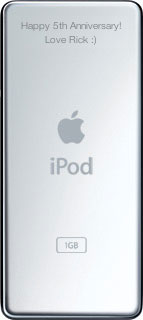
Shiny new iPod Nano
Brand new shiny iPod Nano
(2GB basic model) £90.00
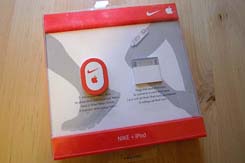
iPod+Nike Sports kit
Nike+iPod Sports kit, sensor on the left,
iPod attachment on the right. £20.00


The Nano was purchased on Amazon.co.uk for about £90 delivered, I managed to find the Nike+iPod kit in a local sports shop so no delivery cost there.

The sensor for your shoe
The sensor for your shoe.
The receiver attached to the iPod


The kit comprises a sensor that you put in your shoe and a receiver that attaches to your iPod Nano, information about your running progress is transmitted from the sensor to the receiver (via some form of bluetooth protocol). You get audio feedback in your headphones as you run telling you how far you’ve gone, and if you run longer than you have before you get a nice little message from a famous athlete (I’ve heard Paula Radcliffe and Lance Armstrong so far!).

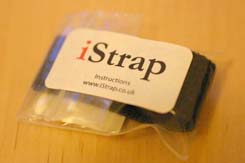
The handy 'iStrap'!
The handy ‘iStrap’! (Please note,
this is not an Apple product!) £1.00
The iStrap's velcro disk attached  to the back of the sensor
The iStrap’s velcro disk attached
to the back of the sensor.


Now, the key ingredient to do the ‘Nike+iPod on a budget’ thing. Presentiing the ‘iStrap’, which is basically a velcro strap and disk that you use to attach the sensor to your shoe. Cost benefit of this over paying £60+ on a pair of the proper Nike+ running shoes? The iStrap is £1.00. Savings? At least £59.00 ;)

The right-hand image above shows the velcro disk attached to the sensor.

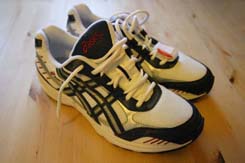
The Asics running shoes
The Asics running shoes (looking
very new and shiny still). £20.00
Shoes with iStrap fitted under the laces
Closeup of the iStrap fitted under
the laces of the running shoes.


Ok, to be fair I have to offset the £59.00 saving with the cost of a ‘normal’ pair of running shoes. So, in the January sales I got a great pair of Asics shoes for £20, so that brings the savings to about £39.00 I guess.

The image to the right above shows the iStrap fitted under the laces of the shoe.

Nike+iPod sensor stuck on the velcro
via the already applied velcro disc.
The sensor enclosed by the iStrap
The sensor enclosed by the iStrap, it’s
held in place quite securely.


The sensor is then attached to the velcro strap which is folded over the top and fastened securely. I was a bit worried about how secure it would be but it’s actually pretty solid, which is good because the sensor doesn’t want to be rattling around as it can affect the measurements taken from it.

Screenshot of additional Nike+iPod menu item
Plugging in the sensor results in an
Additional Nike+iPod Menu item.
Screenshot of content items of Nike+iPod menu item
Some of the menu items found within
the new Nike+iPod Menu item.


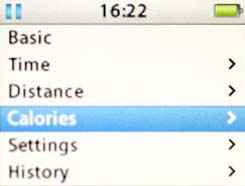
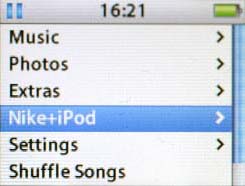
On the iPod itself you get a new entry appearing in the options, once you select the Nike+iPod option you then get other options for choosing the type of workout you want to do. You can choose workouts based on Time, Distance or Calories and you can view past workouts.

Screenshot of runs viewed in Nikeplus.com
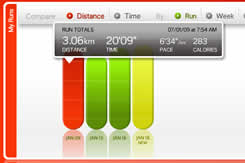
Nikeplus.com shows the details of the runs that you upload via iTunes.
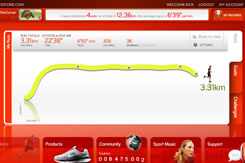
Screenshot of detail of run in Nikeplus.com
You can view the progression
made on your individual runs.


Once you’ve completed a run you then hook up your iPod and the data taken from your run is synced up to the Nikeplus.com website, you can then log in and view the progress of your run in the form of a graph. The graph is accompanied in text form with details like distance, time, pace, calories, type of workout and playlist chosen for the run.

Total cost of my running kit…

  • iPod Nano – £90
  • Nike+iPod Sports Kit – £20
  • iStrap – £1
  • Asics running shoes – £20
  • Reebok running pants – £15
  • Total: £146.00

That’s great, but does it help you run?

That’s a question you might ask, but it really does help you run. As the title of this post states, I’m kind of a non running geek (not that I’m inactive by any means, just never been into running!) but the kit makes running much more interesting for me, the audio feedback for each kilometre (I run in metric!) you run helps you to see the goal you’re aiming for rather than kind of aimlessly running around! So yes, it’s not just a gimmick, it really does help!

~Rick

‘Stories can be either bacteria or light, they can infect a system or illuminate a world’

I was just reading the recent post on Cameron Moll’s website about the first domain name he registered, it set off a discussion in the comments about people’s early website design. It reminded me of a bunch of my early web designs, I enjoyed the nostalgic reminder so I went and had a look at some of it. I’m fortunate to have stayed a part-time employee since I graduated art college in 1997 so all of the stuff I did whilst a student / intern there is still there.

Here’s a few choice items I enjoyed looking at:

Suburbia:

http://www.personal.dundee.ac.uk/~rjcurran/

Suburbia as a name was kicking around in my head way before this blog came into being as you can see from this site under my personal webspace at the college.

Red dust, Roadtrains and redbacks:

http://www.personal.dundee.ac.uk/~rjcurran/australia/index.htm

This was a travel diary I wrote whilst in Western Australia for the first time. This predates the term ‘blog’ so it’s a ‘travel diary’!

Websight

http://www.dundee.ac.uk/tvimaging/tba3/welcome2.htm

This was a site designed for my class at college, it was originally very bright with multi-coloured textured graphics (photoshop filter overdose!). After a while I changed it to this monotone version after I grew tired of the colours! Click on the OK button to enter, then click on the ‘Enter the body’ link to meet all my classmates. Ah the memories!

Time flies when you’re having fun…

I can’t believe it’s been almost 10 years since I graduated and almost 12 years since I first designed a website!

In case you’re wondering about the title of this blog it’s a quote from a writer called Ben Okri who I read a lot around the time I was at college, I came across the following image whilst looking through these old websites:

Stories can be either bacteria or light, they can infect a systeom or illuminate a world.

For Grandma:

According to my Mother-in-law my “Website needs more Nat pictures, less computer stuff”! So, for her here are a few pictures of my daughter Natalie to end this post, these are from 21st Nov 2003 – just to keep with the nostalgic tone of this post!

Natalie #1

Natalie #2

Natalie #3

Natalie #4

~Rick

Cars, Meteors, Jonestown and Office Space

Here’s a few things I’ve come across on the web, as well as just a few thoughts about things, news etc.

Car Dealerships in Second Life:

Picture of Nissan IslandHow can you buy a Nissan, Toyota or Pontiac car for around $1US? Well, get into Second Life or course where Nissan, Toyota and Pontiac hope you will check them out. Now cars come out of vending machines…


Leonid Meteor shower:

Image of Leonid meteorThis weekend sees the annual Leonid meteor shower happen, if you’re up around 04:45 in the mornings of Friday, Saturday or Sunday then you might be able to see up to 150 meteors per hour at that time.

Jonestown: The Life and Death of Peoples Temple:

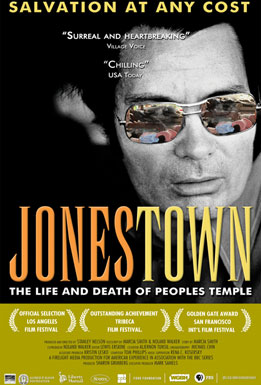
Image of Jonestown movie posterToday is the 28th anniversary of the Jonestown mass suicide in Guyana, an event often referred to as ‘the largest mass suicide/murder in history’. There is a documentary out now called ‘Jonestown’ which documents all of the background to this event.

I’m interested to see this film as I actually lived in Guyana at the time this happened. Although I was only 6 years old at the time I do have some memories of it, I was at a North American school there and I remember there being armed US Marines being stationed outside the School due to there being a bit of a backlash against the US (or at least fear of a backlash).

If you want to read more about this then there’s an interesting page on Wikipedia about it. You can also see a trailer for the movie over on Quicktime.com.

Wanted: One new office:

I just found out on Friday the floor of the building where I run my business will not be available after the current lease held by Scottish Enterprise runs out. So, it seems I’ve now got to look for a new office! Even worse I’m probably going to have to do so before the end of December which doesn’t leave much time.

It wasn’t the best news to find out last thing on a friday, we had thought we were going to be able to stay on beyond the expiry of the lease but it seems the Landlord’s had a better offer apparently. If you know of any nice office space around 300 – 500 square foot, preferably with a nice view then let me know ;)

~Rick

MacHeist – Want an invite?

If you’re a Mac user, like free or cheap software and don’t mind a little challenge to get it then you might like to check out the invite-only MacHeist.

Picture of Macheist website

MacHeist has been described:

MacHeist is a 5 week long event that will be invitation-only at first and will work towards an รผber bundle at the end with the last week starting on December 11th.
~PaulStamatiou.com

Anyway, if that’s got you interested then I have some invites for it, I’ve got 7 at the moment so if you want one get in touch! So far the 1st week’s challenge has already been done and I’ve got 3 little applications for free already.

~Rick

Something’s cooking in Adobe labs…

There’s some really interesting stuff coming out of Adobe recently, they have a section on their website called Adobe Labs which has a lot of new software being developed but is available for testing.

Soundbooth

There’s a new application called ‘Soundbooth’ that has just appeared on their Labs website. The description for Soundbooth says:

Soundbooth is a brand new application built in the spirit of Sound Edit 16 and Cool Edit that provides the tools video editors, designers, and others who do not specialize in audio need to accomplish their everyday work such as:

  • Editing audio quickly.
  • Cleaning up noisy audio.
  • Visually identifying and removing unwanted sounds.
  • Recording and polishing voiceovers.
  • Adding effects and filters.
  • Easily creating customized music?without musical expertise.

My initial thought is that it sounds like something to compete with Apple’s Soundtrack Pro or GarageBand software. I’m going to check it out and see, it’s available for both Windows and Mac, although only Intel Macs will ever be supported interestingly.

ยป http://labs.adobe.com/technologies/soundbooth/

Lightroom

If you’re into digital photography then you’ll definitely want to check out Lightroom. It’s a piece of software that provides for the whole workflow of digital photographers, not just for doing retouching but actually the whole importing, comparing, selection process as well as colour correction and output. This software is comparable to Apple’s Aperture software which has been out for some time which is also and excellent piece of software. Go and check out Lightroom now if you haven’t already.

ยป http://labs.adobe.com/technologies/lightroom/

Digital Editions

This is a new eBook reader / management application providing a way to read eBooks, not just in PDF format but also HTML too. The description for Digital Editions introduces itself:

Adobe Digital Editions is a completely new way to read and manage eBooks and other digital publications. Digital Editions is built from the ground up as a lightweight, rich Internet application (RIA). Digital Editions works online and offline, and supports both PDF and XHTML-based content.

Digital Editions is currently only available as a Windows download, but if that doesn’t put you off then I’m sure it’s worth checking out.

ยป http://labs.adobe.com/technologies/digitaleditions/

Disclaimer – Beta Software!

Remember, all these packages are beta software, that means they are available for testing purposes. I would always recommend making sure you have all your important data backed up before trying them out!

Adobe appends each one with the following notice:

Note: This is a public beta, not a final release. Neither the quality nor the features are complete yet. We want to show you our direction and get your feedback so that we can incorporate it into future releases.

Go check them out.

~Rick